Saturday, October 31, 2009

17/365 - Me as a Ghost

Me as a Ghost

Since it's Halloween, I thought it was the appropriate time for some trick photography-- namely, a "ghost" image.

Back when I was younger, my parents were really into photography for a while. My father even set up a makeshift darkroom in their bathroom. In addition to the traditional portraits and landscapes they took, there was also some fun experimental photography-- lightning, fireworks/sparklers, and multiple exposures, for instance. One of the multiple exposures I remember resulted in twin Moms, even though my mother is not a twin. (g) In another, I was a "ghost", the background of the room mysteriously showing right through me. (Spoo-ooo-ooky!)

These days, it's so much easier and quicker to make a ghostly photograph. Basically, you just put your camera somewhere where it won't move (like a tripod or a table) and take two photos-- one of the "ghost" (in this case, I used a remote and photographed myself) and one of the exact same scene without the person in it (here, a brick wall). (I was planning to use some trees and shrubs as my background, but quickly realized that the breeze would make the background shift too noticeably.) Layer the photo of the person on top of the other in a photo editing program. Lower the opacity of the top layer, and there's your ghostly photo! Of course you can also do all kinds of other things in conjunction with this technique. For instance, I made the images sepia-toned. (For another presentation of the ghost technique, visit this page.)

The results aren't usually really that realistic-- no-one from the modern world will be terrified (g)-- but what would a "realistic" ghost photo look like, anyway? ;o) 

Editing: This one had quite a bit of editing. Let's see how much I can remember. . . Cropped, Resized, Grayscaled/Duotoned (two-part process to convert to sepia), Layered and Opacity changed (as described above), Curves (to lighten), Unsharp Mask. . . I used the Dodge and Burn tools to lighten and darken a few spots. . . I think I may have used the Spot Healing tool and/or Clone tool here or there. . . I used the Eraser tool (at various strengths) to erase my other hand (which had been holding the camera remote) and to soften the edges of the "me" photo and make myself dissolve a little more into the brick in spots. I also added a vignette around the whole photo and the Dodge tool to lighten it a little in the middle.

Friday, October 30, 2009

16/365 - Leathern

Leathern

There's not much to say about this one.  It's a macro of a leaf blown into our yard from some unknown tree on one of the occasional gusts we're experiencing this afternoon. (Our weather has shifted back to lukewarm mugginess-- not summertime heat, thank goodness, but not crisply autumnal, either. We're expecting rain overnight, though, and after that we should get some relief from the humidity.)

The color and texture of the fallen leaf reminded me of leather, as you may have guessed from the title. ;o)

Editing: Cropped, Resized, Curves, Unsharp Mask.

Thursday, October 29, 2009

15/365 - I See You

15/365 - I See You

These green anoles are common in our yard.  One day we spotted five at one time clinging here and there around the patio.  Fortunately, they're not frightening.  In fact, I'll even go so far as to say that I like them (though I felt a twinge of "how dare you" when one ate a butterfly before my very eyes).  At least they give us something to look at, out there.  ;o)

This little lizard was particularly tiny.  For reference, the wood he (?) is on is a (roughly) 1.25" x 1.25" baluster on our patio railing.  I wonder if these teensy lizards we've been seeing hatched out of those tiny eggs I found a while ago. . .

Most of the time, these lizards are fairly bold.  They don't mind being looked at or photographed.  (Or maybe they just think they've blended in so well that we can't see them. (g))  This one, on the other hand, was very camera-shy.  He made a few trips around the baluster in attempts to avoid me and (as you can see here) sometimes gave me a look.  ("Mind your own business, won't you?  Can't you see I'm busy here?")  

Editing:  Cropped, Curves (to lighten), Spot-Healing Tool (to clean up some spots of dirt on the wood), and Unsharp Mask.  Oh, and resized, of course.  I think every single photo in this project will have been resized (usually right after cropping), so just take that step for granted, if you're keeping up with the editing information.  (I doubt many people are interested in this part of the project, but I thought I might as well make editing notes for my own benefit.) 

Wednesday, October 28, 2009

14/365 - "Now. . . why am I eating this, again?"

"Now. . . why am I eating this, again?"

Other title considered:
"Mr. Pinecone, why you taste so bad?"

She wasn't really eating it, of course. Just tearing off pieces and spitting them out. Making life a little easier for any squirrel daring enough to enter our yard in spite of the "BEWARE OF DOG" signs posted on the gates. ;o)

I would've liked to have made the photo of the day the one of Molly and Trixie together, but the focus just wasn't quite right on that one. (I'm sorry, Molly. One of these days, I will get a decent photo of you, again. Maybe even in time to include it in this project! (g))

Editing: Hardly any (by my standards). Cropped, Curves (to lighten, mainly), Unsharp Mask. Also, a tiny bit of Dodging on her eye to bring out the highlight.

Tuesday, October 27, 2009

13/365 - Teal Squirrel

13/365 - Teal Squirrel

It's a dreary day, and I don't expect to be taking many photos, so this particularly uninspired photograph will have to do.

The squirrel came from Dollar Tree, I think. He was never very attractive, and I'd planned to paint him and use him as a garden ornament, but somehow I never did.

After he spent some years outside (fading to an even less attractive state), I finally brought him inside for painting. I wasn't sure how I wanted to paint it, but this wasn't what I had in mind. However, in a moment of madness, I gave the whole thing a wash of watered down teal paint-- leftovers from something else I'd just finished painting.

I can't decide if I like it this way or not... He looks kind of moss-grown, which I do like, so I'll probably leave him like this for a while.


Editing: The usual + a light Ortonizing & a hint of Vibrance.

Edited to add:
Well, I actually did take a few more photos today-- of a little snake I found on our fence.  I guess I'll leave this photo as the picture of the day, but if I'd known there'd be snake photos to be had later on, I'd have waited.  ;o)

Monday, October 26, 2009

12/365 - Autumn Leaf

Autumn Leaf

We don't get a whole lot of autumn color down here in coastal Alabama, but what we do get is appreciated.

This is the leaf of a "popcorn tree", one of those that actually get a little color.

Editing: Pretty much the same as usual... I think I used the Vibrance tool on this one.

Sunday, October 25, 2009

11/365 - Dragonfly Wings

11/365 - Dragonfly Wings

We found a dragonfly hanging on to an oak tree in our yard. I don't know what it was up to (maybe nearing the end of its life, maybe just taking a rest), but it let us get very close and sat almost perfectly still while I fetched the camera and photographed it.

Dragonflies are one of those few insects I actually like. Most of them, I don't particularly want to touch (even though they make good photos), but I think I'd be ok with a dragonfly. (g)

Editing: The most interesting aspect of editing this photo (as well as a few others from today and yesterday) was that it is actually two photos in one.  I combined two photos of the same subject, allowing only the best, sharpest portions of each to show in the final product.  I think this can be a very useful technique, but yesterday was my first time using it, so I'm still learning its ins and outs. 

Here's how I did it (for future reference): 
Open the two photos in Photoshop.  Select one and paste it as a new layer onto the other.  If necessary-- if, like me, you didn't use a tripod when taking the photos-- lower the opacity of the top layer and position it so that the two line up as perfectly as possible.  Pull the opacity back up.  Select Layer > Layer Mask > Reveal All.  Using the paint brush tool (w/ black as the paint color), "paint" where you want to bottom layer to show through the top.  

...That's about all.  It's not difficult, and I can think of many possible uses.

Saturday, October 24, 2009

10/365 - Frills

Frills

I'm in the double digits! ;o)

Today, I couldn't decide what photo to choose, so Donald helped by giving his opinion.  (Thank you!)

There's not much to say about this one. . . I could've selected a photo of a Scrabble board or one of the cloud photos I took today (but haven't uploaded yet), but I thought one of these mushroom photos would be better, even though I've already chosen a picture of a mushroom for this project.  (As you can see, I'm still having a hard time just going with the flow.)

I found a couple of nice-looking mushrooms this morning and finally got around to photographing them in the afternoon. I find I have a hard time getting a good photo of a mushroom that's still in the ground-- or of anything that's so close to the ground.  (Besides, by the time I got around to photographing these, they were in the shade of the house.  Not very good lighting.)  So I plucked them and took them to a better place where there was still a little light and an unevenness in the ground gave me an easier angle taking photos.  (Cheating?  No, not at all!  It's just good sense.  (g))

Editing:  Cropped (which is something I frequently do, but may forget to mention from time to time, since I think it almost doesn't count), Curves, Unsharp Mask.  Also, I'm pretty sure that for this one I copied it into a second layer and manipulated them (Curves, mainly) separately. (Copying an image and layering one over the other is one way to get deeper, richer colors-- or a dreamy look-- or something altogether other-worldly.

Friday, October 23, 2009

9/365 - Crochet Colors

9/365 - Crochet Colors

I started my second "for real" crochet project a few days ago. (I ran into some confusion, but I've got it figured out, now.) From the first moment I started this project, I found myself luxuriating in the contrast between the color of the yarn (a very golden green the yarn maker calls "Old Leaf", but which some misguided person might label "pea soup green") and that of the crochet hook I'm using-- a beautiful red violet. It will almost be a shame when I'm done-- but it's good color inspiration for future projects (not limited to ones involving yarn).

I tried to adjust the colors to match the real things, but I'm still not sure if I got it just right. Maybe the green isn't green enough, but I'm just not sure... It's close enough, I guess.

Editing: Curves (which is what I use for most of my lightening / darkening), Color Balance (for adjusting colors), Unsharp Mask (to sharpen).

Thursday, October 22, 2009

8/365 - Skipper Butterfly

8/365 - Skipper Butterfly

I found some type of skipper butterfly fluttering from bloom to bloom on a Mexican petunia growing beside the patio. I'm not sure exactly what kind it is, but it had a nice greenish iridescence on its back (and the tops of the wings).

I find myself uncertain whether or not each photo I choose "deserves" to be my photo of the day. I need to just face it that I'm not going to capture something amazing every day of the year.  The idea is to take a photo every day.  They don't have to be award-winning quality. Even a casual snapshot counts.

Today, I chose this butterfly over the gloomy, layered photo of petal-less roses because I think I might tend toward the gloomy photos too much-- and because butterflies probably won't be frequent guests in our garden in the coming fall and winter months. Better enjoy it while I can. . .

Editing:  Color correction / lightened... unsharp mask... a light vignetting... and I think that's it.

Wednesday, October 21, 2009

7/365 - Trixie in the Grass

7/365 - Trixie in the Grass

"Another dog photo? Already? You do realize that out of a whopping seven days, this is the third to feature a dog?"

Yes, I know, and it won't be the last time Trixie makes an appearance, I'm sure. Look, the dog is photogenic, and I'm sometimes unimaginative. She's gonna be popping up a lot in this set. It's best that you get used to the idea, if you plan on following my Project 365. ;o)

Editing on this one was fairly light. . . Color/lighting correction, unsharp mask, and a little lightening of the shadowed eye. (My favorite Photoshop tool for fixing Shadowy Eye Syndrome in Trixie photos is the dodge tool. It works wonders!)

P.S.  She was eating grass just before I took this photo, so if you want to see Trixie in an elegant pose with grass hanging out of her mouth, be sure to check out the photostream at Flickr.  That one's just a few photos back from this one. . .

Tuesday, October 20, 2009

6/365 - Textures

6/365 - Textures

I thought I'd give self-portraiture a try today. I wasn't entirely pleased with the results, but I'm "making do".

This is me sitting out on the porch swing with a denim rag quilt and my newly crocheted scarf. (Even though it's gotten warm enough today that I didn't really need either, I thought they'd make a more interesting photo.)

Sepia-toned and gently Ortonized.

Monday, October 19, 2009

5/365 - Solitary Pine, Now Dead

5/365 - Solitary Pine, Now Dead

This pine standing out by itself (after Hurricane Ivan necessitated the clearing of what was once a thick planting of trees) has now died.

I wonder how much longer before it falls. . .

In the meantime, it's standing starkly empty, except for the cones still clinging to its branches.

Sunday, October 18, 2009

4/365 - Happy Dog

4/365 - Happy Dog

Ok, she was actually just barking-- but she looks so happy! And when is a dog happier than when she has a reason-- any reason-- to bark? ;o)

Today, Trixie's enjoying being out in the cool weather by romping around the yard (and, here, the patio). I guess that built-in fur coat is doing its job, since she kept returning to a patch of shaded grass to lie in, rather than selecting a sunny spot to bask in.

Saturday, October 17, 2009

3/365 - Skipper

3/365 - Skipper

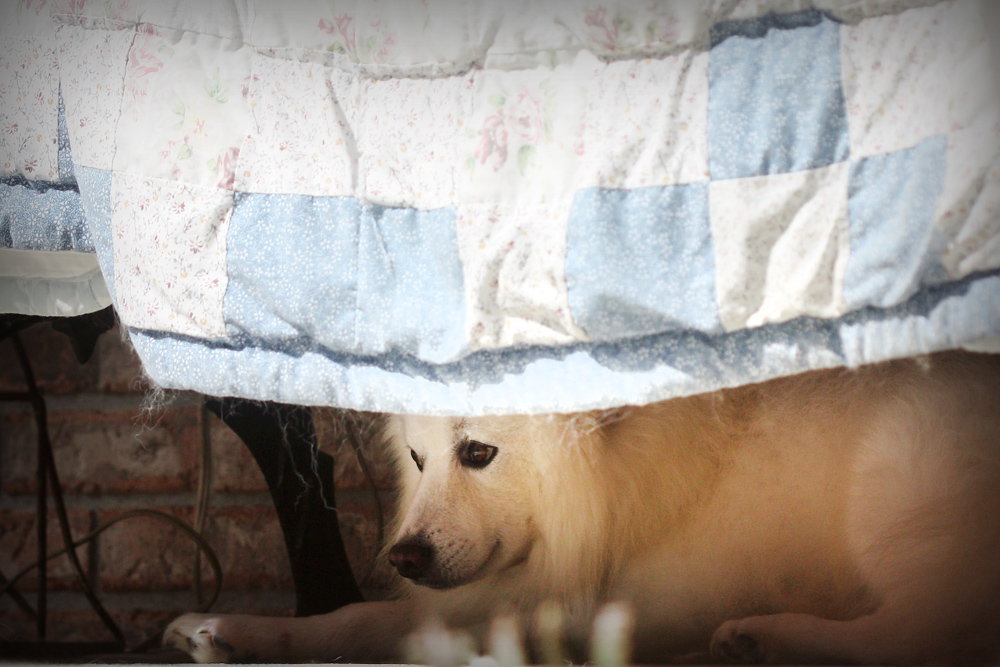
Here's my maternal grandparents' Eskie, Skipper, in one of his favorite spots-- under the bench on the back porch. (The family gathered for lunch and a social afternoon in celebration of Aunt Cathy's birthday.)

In many ways, this isn't a great photograph. It's not quite sharp enough, and is overexposed on the quilt/underexposed on Skipper, but it's still my favorite from today. I think I'm going to go on that basis alone-- whichever photo I like best is the "photo of the day".

Friday, October 16, 2009

2/365 - Shadows & Reflections

2/365 - Shadows & Reflections

The change from a warm and muggy yesterday to a breezy, crisp, and cool today was more than enough of an excuse to wander up and down the easement with the camera. There were a few wildflowers-- an ever-changing canvas of cloud and blue sky-- delicate, sunlit greens still untouched by frost-- drifting leaves and pine straw-- but my favorite photo today came from a humble mud puddle in the dirt road.

This is why I love our macro lens best. A puddle that looks messy in "real life", is rendered beautiful (imho) by that lens (and a touch of Photoshop).

Thursday, October 15, 2009

1/365 - Petticoat

1/365 - Petticoat

I titled this photo "Petticoat" because that's what the frilly ruffles on the bottom of this mushroom cap remind me of.

This was one of a fairy semi-circle in our front yard. I'd intended to take a photo of the whole group, but by the time I got out there, most had shriveled away in the sun. Moral: Don't wait too long-- Seize the moment-- etc., etc. ;o) It's a good moral for the start of a year-long photo project, I think.

What is Project 365?

Participants in Project 365 have decided to put their willpower and photographic ability to the test by taking (at least) one photo every day for a year.

The reasons behind the project vary from person to person. Some want to preserve a year in photographs-- some want to learn to take better photos-- and others are just looking for a little extra motivation to get that camera out every single day. For me, it's a little of all of those things, plus pure curiosity to see if I can meet the challenge.

I have decided to give my Project 365 the broadest possible scope. Anything goes-- from floral macros to self-portraits and everything else that happens to strike my fancy. (However, I may decide to devote certain weeks or even months to specific subjects or photographic styles.)

Thanks for stopping by, and if you like what you see here, you might want to check out the non-Project-365 photos on my Flickr photostream.